O2 XDA IIs Reviewed!!!!

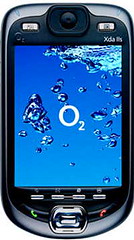
Here comes, straight from the Stable of O2, the all new and superb O2 XDA IIs (or shall I call it as O2 XDA III in German Style). Both the previous models from O2 have been hits, specially the XDA II with the first of its kind to have a Bluetooth Support.

The IIs works on 400 MHz processor and preforms good, though there are PDAs which run on either 520 or 624 MHz. The 102 MB of user RAM and 40 MB of non-volatile memory, makes it look (rather work) gorgeous second by second. All the battery life is good and worth a mention.

The XDA IIs is similar in shape and form factor as of XDA II – however the real change in these two models is that in XDA IIs, the front half of the device glides to reveal a full QWERTY keyboard (or for that matter we call it thumbboard) – something which was used as an accessory with XDA II

It has as black matte finish, away from the regular silver colored ones, with a 16-bit colour display. The top layer on the case, just above the display has the two standard buttons along with four additional buttons at the bottom to access Start menu, open the Messaging app and Internet Explorer. The fourth button “Ok” really helps to do a one handed operation.

It also includes the 0.3 Megapixel camera lens in the upper right corner on the back of the device, a loudspeaker in the center on the top of the XDA.

The XDA IIs can be called as Wireless Freako – quad-band GSM/GPRS 850/900/1800/1900 MHz with GPRS Class 8 and 10, Blueooth and Wi-Fi 802.11b – will be more than enough for anybody’s Wireless games, surfing as well as connectivity. Under the hood, the IIs offers an SDIO capable SD/MMC Card expansion slot, doubles up as a dial-up modem via either serial or USB – courtesy of the bottom connector.

The XDA IIs runs the Second Edition of Microsoft’s Windows Mobile 2003 for Pocket PC platform. The O2 Active User Interface offers up handy menus including links to offerings from O2 as well as chalks up points for including easily accessible mute button in Active UI. Wireless Manager utility is for non-power users, while the Enroller application for use with 802.11x-enabled Wi-Fi networks and a MIDlet manager.

To sum it all in few words, the O2 XDA IIs is Jack-of-All-Trades, a real value for those users who want to be connected all the time, for those users who want superb connectivity support, solid performance, an integrated thumbboard and a spacious amount of memory. However the only glitch that I feel, is that its on the heavy side, in terms of the weight.

VISA’s Explained!!

On my recent visit to the US Consulate at Mumbai, I was not sure about the kind of visas that they would give to students. That time I felt as if I need to know all the kinds of visas’ issued. Here is a list of them:

A Visas (Official Visas)-

A-1: For Ambassadors, public ministers & consular officers

A-2: For immediate family members of A-1

A-3: Attendants & servants of A-1 and A-2 holders

B (Business/Visitor) Visa –

B-1 Temporary visitor for business

B-2 Temporary visitor for leisure

C & D Visa (For Aliens in transit) –

C-1,2: Alien in transit directly through US

C-3: Family of C-1,C-2 in transit

C-4: Transit without Visa(TWOV)

D-1: Sailors departing on vessel of arrival

D-2: Sailors departing by other means

E – Visa (For Traders/Investors) –

E-1 Treaty Trader, spouse and children

E-2 Treaty Investor, spouse and children

F Visa (Students) –

Want to study or research at a U.S. college? Then F is the visa for you –

F-1: Academic Student

F-2: Spouse or child of F-1

H (Temporary Worker) Visa –

H-1B: Persons in a specialty occupation

H-2B: Seasonal nonagricultural workers

H-3: Trainees other than medical/academic; also training of handicaps

H-4: Dependants of H visa holders

I Visa (Mediapersons) –

Are you a reporter, film person, Editor? Then you require an I-visa –

Essential docs: Your press ID, a letter from the editor.

J & Q Exchange Visitor Visa –

J-1 exchange visitors may be academics, scientists, businesspeople or students.

J-1: Visas for exchange visitors

J-2: Spouse or ‘child’ of J-1 under 21

Fiance(e) of US Citizen –

K-1 Fiance(e)

K-2 Minor child of K-1

K-3 Spouse of a U.S. Citizen (LIFE Act)

K-4 Child of K-3 (LIFE Act)

Docs: Marriage certificate & Photos, Intent of marrying within 90 days

in US(for K1).

L Visa (Intracompany Transferees)-

L-1A Executive, managerial

L-1B Specialized knowledge

L-2 Spouse or child of L-1

Vocational and Language Students –

M-1 Vocational student or other non-academic student

M-2 Spouse or child of M-1

O -Visa (For Prodigies) –

O-1: For a Genius in Sciences, Arts, Education, Business, or Athletics.

O-2: Alien’s (support) accompanying O-1

O-3: Spouse or child of O-1 or O-2

Athletes and Entertainers-

P-1: Athletes & Entertainment groups

P-2: Entertainers in exchange programs

P-3: Entertainers in cultural programs

P-4: Spouse or child of P-1, 2, or 3

R-Visa (Religious Workers)

R-1 Religious workers

R-2 Spouse or child of R-1

Enhanced Data Rates for Global Evolution (EDGE)

The introduction of EDGE in GSM phase 2+ enhances existing GPRS/GSM infrastructure, allowing 3G speeds up to 384 kbps. Unlike UMTS that uses licensed WCDMA (Wideband Code Division Multiple Access) frequency bands, EDGE is able to use existing GSM/GPRS frequency bands (800, 900, 1800 and 1900 MHz) to offer comparable speeds and compliance with IMT-2000.


GPRS and EDGE share the same symbol throughput rate but the latter uses symbols representing 3 bits instead of 1. In order to achieve this EDGE uses a new modulation technique called 8-phase shift keying (8PSK) and 9 different coding schemes (compare to GPRS which has 4).


This means consumers can connect to the Internet and send and receive data, including digital images, web pages and photographs, three times faster than possible with an ordinary GSM/GPRS network connection.

For more info visit: http://www.gsmworld.com/technology/edge

The Great Writer!!!

There was once a young man who, in his youth,professed his desire to become a great writer. Whenasked to define “great” he said,

I want to writestuff that the whole world will read, stuff thatpeople will react to on a truly emotional level,stuff that will make them scream, cry, howl in painand anger!


He now works for Microsoft, writing error messages.

Source: A friends’ forward in my Inbox

Google’s Passport Service !!

Recently, during a tech discussion with friends, something called “Google Web API” came up. Not knowing what its was, I went back to the search engine.

When I tried to download the API from the website, it required a creation of a something called Google Account. Going though the website, the instant thing that came in my mind was Microsoft’s Passport Service.

Seems like Google is goin the Microsoft way, one ID used everywhere.

Linked List using C#.NET

Moving away from the college syllabus. Tried to Implement a linked list in C#.NET. A small code snippet on this..

public class List

{

private ListNode m_FirstNode;

private ListNode m_LastNode;

private string m_strListName;

private int m_intListCount;

// Construct empty list with specified name

public List(string strListname)

{

m_strListName = strListname;

m_intListCount = 0;

m_FirstNode = m_LastNode = null;

}


// Construct empty List with “List” as default name

public List() : this(“List”)

{

}

// IsEmpty Property Check if the list is Empty, returns true if list is Empty

public bool IsEmpty

{

get

{

lock(this)

{

return m_FirstNode == null;

}

}

}

// return number of elemets in List

public int Count

{

get

{

return m_intListCount;

}

}

// return first element in List

public ListNode First

{

get

{

return m_FirstNode;

}

}


// return Last element in List

public ListNode Last

{

get

{

return m_LastNode;

}

}

// Insert Object at front of list. If list is empty, first node

// & last node will refer to same object.

// Otherwise, first node refers to new node

public void InsertAtFront(object objItem)

{

lock(this)

{

if(IsEmpty)

m_FirstNode = m_LastNode = new ListNode(objItem);

else

m_FirstNode = new ListNode(objItem,m_FirstNode);

m_intListCount++;

}

}

// Insert Object at end of list. If list is empty, first node & last node will refer to same object.

//Otherwise, last node refers to new node

public void InsertAtBack(object objItem)

{

lock(this)

{

if(IsEmpty)

m_FirstNode = m_LastNode = new ListNode(objItem);

else

m_LastNode = m_LastNode.Next = new ListNode(objItem);

m_intListCount++;

}

}

// Insert and object in specific place in list

public void InsertAt(object objItem,int Index)

{

lock(this)

{

if(Index &gt m_intListCount || Index &lt 0)

throw new OutOfRangeException(Index.ToString());

if(Index ==0)

InsertAtFront(objItem);

else if(Index == (m_intListCount-1))

InsertAtBack(objItem);

else

{

ListNode currentNode = m_FirstNode;

for(int i=0; i<Index; i++)

{

currentNode = currentNode.Next;

}

ListNode newNode = new ListNode(objItem,currentNode.Next);

currentNode.Next = newNode;

m_intListCount++;

}

}

}

//reset first node and last node references

if(m_FirstNode == m_LastNode)

m_FirstNode = m_LastNode = null;

else

m_FirstNode = m_FirstNode.Next;

m_intListCount–;

return removeItem;

}

}

//remove last node from list

public object RemoveFromBack()

{

lock(this)

{

if(IsEmpty)

throw new EmptyListException(m_strListName);

object removeItem = m_LastNode.Data;

//reset first node and last node references

if(m_FirstNode == m_LastNode)

m_FirstNode = m_LastNode = null;

else

{

ListNode currentNode = m_FirstNode;

while(currentNode.Next != m_LastNode)

currentNode = currentNode.Next;

m_LastNode = currentNode;

currentNode.Next = null;

}

m_intListCount–;

return removeItem;

}

}

}

Refernence:

Data Structures using .NET : Leech

Which of these is better? NTFS or FAT32

A Windows XP question that comes up frequently in each user’s mind is “Which format is the best one to use: NTFS or FAT?”. The answer obviously is “Depends on where you are using the Operating System?”

FAT stands for File Allocation Table, and it dates way back to DOS days, when the operating system fit on a single 360k / 1.44Mb floppy. Just think of it, as the amount of floppies required to boot into XP.. ;). Beginning with Windows 95 SR-2, FAT was upgraded from 16 bit to 32 bit, and so when we refer to FAT, we are actually talking (these days) about FAT32, not FAT16. FAT32 overcame some of the inherent limitations of FAT16 disk and volume sizes, as well as directory entry restrictions, long filename restrictions, and large cluster sizes, which wasted large amounts of disk space when storing small files. FAT32 volumes, in theory, can range in size from less than 1 MB up to 2 TB (TeraBytes). FAT32 is the native file system of Windows 98 and Windows ME, although it is supported by Windows XP/2000.

NTFS, or New Technology Filling System, is the native file system of Windows NT Windows 2000, and Windows XP. NTFS is a “journaling” filing system, which means that it is less likely to become corrupt, and will recognize errors or bad sections of disk and correct itself automatically. NTFS volumes can only be accessed (directly, not through shares) by Windows 2000 and later versions (NT/XP), without the aid of third-party softwares. Because of the larger overhead, NTFS cannot be used on floppy disks, and the minimum recommended size for an NTFS volume is 10 MB. However, the maximum supported volume size is 2 TB, and there is no limit on the file size. NTFS also supports file encryption, file compression, file permissions and auditing, as well as many fault-tolerant disk configurations such as mirroring and RAID 5.

Installing LOVE!!!

Tech Support: Yes, … how can I help you?

Customer: Well, after much consideration, I’ve decided to install Love. Can you guide me though the process?


Tech Support: Yes. I can help you. Are you ready to proceed?

Customer: Well, I’m not very technical, but I think I’m ready. What do I do first?

Tech Support: The first step is to open your Heart. Have you located your Heart?

Customer: Yes, but there are several other programs running now. Is it okay to install Love while they are running?


Tech Support: What programs are running?

Customer: Let’s see, I have Past Hurt, Low Self-Esteem, Grudge and Resentment running right now.

Tech Support: No problem, Love will gradually erase Past Hurt from your current operating system. It may remain in your permanent memory but it will no longer disrupt other programs. Love will eventually override Low Self-Esteem with a module of its own called High Self-Esteem. However, you have to completely turn off Grudge and Resentment. Those programs prevent Love from being properly installed. Can you turn those off?

Customer: I don’t know how to turn them off. Can you tell me how?

Tech Support: With pleasure. Go to your start menu and invoke Forgiveness. Do this as many times as necessary until Grudge and Resentment have been completely erased.

Customer: Okay, done! Love has started installing itself. Is that normal?


Tech Support: Yes, but remember that you have only the base program. You need to begin connecting to other Hearts in order to get the upgrades.

Customer: Oops! I have an error message already. It says, “Error – Program not running on external components.” What should I do?


Tech Support: Don’t worry. It means that the Love program is set up to run on internal Hearts, but has not yet been run on your Heart. In non-technical terms, it simply means you have to Love yourself before you can Love others.

Customer: So, what should I do?


Tech Support: Pull down Self-Acceptance; then click on the following files: Forgive-Self; Realize Your Worth; and Acknowledge your Limitations.

Customer: Okay, done.

Tech Support: Now, copy them to the “My Heart” directory. The system will overwrite any conflicting files and begin patching faulty programming. Also, you need to delete Verbose Self-Criticism from all directories and empty your Recycle Bin to make sure it is completely gone and never comes back.

Customer: Got it. Hey! My heart is filling up with new files. Smile is playing on my monitor and Peace and Contentment are copying themselves all over My Heart. Is this normal?

Tech Support: Sometimes. For others it takes awhile, but eventually everything gets it at the proper time. So Love is installed and running. One more thing before we hang up. Love is Freeware. Be sure to give it and its various modules to everyone you meet. They will in turn share it with others and return some cool modules back to you.

Customer: Thank you, God.

Generica in .NET Framework

When we look at the term “generic“, unrelated to the programming world, it simply means something that is not tied to any sort of brand name. For example, if we purchase some generic dish soap, soap that has no brand name on it, we know that we are buying dish soap and expect it to help us clean our dishes, but we really don’t know what exact brand (if any) will be inside the bottle itself. We can treat it as dish soap even though we don’t really have any idea of its exact contents.

A perfect example of where we would need Generics is in dealing with collections of items (integers, strings, Orders etc.). We can create a generic collection than can handle any Type in a generic and Type-Safe manner. For example, we can have a single array class that we can use to store a list of Users or even a list of Products, and when we actually use it, we will be able to access the items in the collection directly as a list of Users or Products, and not as objects (with boxing/unboxing, type casting).

Currently, if we want to handle our Types in a generic manner, we always need to cast them to a System.Object, and we lose any benefit of a rich-typed development experience. For example, with the System.Collection.ArrayList class in Framework v1 and v1.1. If you have used it at all, you will notice a few things about it:

1. It requires that you store everything in it as an object

2. You need to cast up in order to get your object back to its actual Type

3. Performance is really lacking, especially when iterating with foreach()

4. It performs no type safety for you (no exceptions are thrown even if you add objects of different types to a single list)

If we had a User object, you could create another class (which implements IEnumerable and IEnumerator, or just IList) that allows you to only add and access User objects, even though most implementations will still store them as objects. It is a lot of work implementing these two interfaces, and you can imagine the work needed to create this additional collection class every time you wanted a Type-safe collection. The third and final way of creating a collection of items is by simply creating an array of that type, for example:

string[] mystrings = new string[]{“a”, “b”, “c”};


This will guarantee Type safety, but is not very reusable nor very friendly to work with. Adding a new item to this collection would mean needing to create a temporary array and copy the elements into this new temporary array, resizing the old array, copying the data back into it, and then adding the new item to the end of that collection. In my humble opinion, this is too much work that tends to be very error prone.

References:

System.Collections.ArrayList Class

http://msdn.microsoft.com/library/en-us/cpref/html/frlrfSystemCollectionsArrayListClassTopic.asp

System.Object

http://msdn.microsoft.com/library/en-us/cpref/html/frlrfSystemObjectClassTopic.asp

Linux Explored!!!

Guys,

Just try out these amazing set of commands ;). Probably the lighter side of Linux I must say !!!!

$cat “food in cans”

cat: can’t open food in cans

$ nice man woman

No manual entry for woman.

$ rm God

rm: God nonexistent

$ ar t God

ar: God does not exist

$ ar r God

ar: creating God

$ make love

Make: Don’t know how to make love.

$ sleep with me

bad character

$ got a light?

No match.

$ man: why did you get a divorce?

man:: Too many arguments.

$ !:say, what is saccharine?

Bad substitute.

$ drink bottle: cannot open

opener: not found