Project Kahuna – A rich new mail Experience from Microsoft

Having read all the rumors over the next, now that MS says is official, here is a small post to know what can you expect out of the new Microsoft Mail (Or shall I call it MMail – sounds fimilar to something with G, right) 😉

Microsoft Mail Beta is Microsoft’s brand new web mail service. The product is being built from the ground up based on input and feedback from customers. Microsoft is inviting people from the MSN Messenger beta to join the beta of their brand new web mail service. Testers will be part of the first group outside of the product team to experience the Mail Beta.

A hotmail account is required and is moved over to the new beta automatically. It includes 2GB of space, includes a rich text editor, protection from “phishing” scams and a new easier layout. Reading Pane Cruise through your e-mail with ease, as you go from mail to mail without loading a new page. The Reading Pane lets you preview the text and thumbnails of attached images in your Inbox. Just click the message to display the full content of the e-mail. The Info Bar tells you when the Mail Beta doesn’t recognize a sender, allowing you to block the sender with a single click, and bounce back an e-mail to help prevent a junk mailer from knowing you exist (Remember SenderID that I posted about few months back). The Mail Beta also protects you from criminals trying to obtain (“phish”) your personal information by hiding an e-mail’s content when it suspects the sender may be fraudulent.

Address AutoComplete – When you start typing the name of a contact in the address field, Address AutoComplete offers suggestions of matching names from your contact list. Keyboard shortcuts Mail Beta allows you navigate the way you prefer—via your keyboard, mouse, or a combination of the two. These keyboard shortcuts let you easily and quickly navigate through messages and folders. Mail Beta also enables multiple select via a combination of your keyboard’s arrows or mouse and the shift key. Many more keyboard shortcuts to come! Rich text editing Say what you want to say, the way you want to say it! Rich Text Editing lets you add color, shading, and emoticons, control font size, and define formatting.

Best of all, Mail Beta preserves all HTML formatting in the e-mails you receive so you can forward emails and know others will see them the way you do. Storage that grows with you, starting you with 2GB (2 gigabytes) of storage so we can save more e-mail, more photos, more attachments, more of everything. Over time there are plans to develop a system that will grow as you need more space.

Save sent e-mail – No need to cc: yourself on every outgoing e-mail. All the e-mail you send will now be saved in a “sent e-mail” folder—automatically.

Threats and Threat Modelling – MAQSoftware, Mumbai

Yesterday I did a small 60 minutes session on Threats and Thread Modelling at MAQSoftware. I spoke on three points:

1. SQL Injections
2. XSS Attacks
3. Session Hijacking

SQL injection included the ways in which a programmer makes common mistakes, by not hashing or encrypting a password, and how a hacker would take advantage of this and make SQL Injected attacks. These attacks are basically attacks which are done over a database.

XSS included how a ‘script’ tag is used to spoof the user to store his cookies over an attackers machines. Also tried and explained how would a Hacker hijack a session with the help of stored cookies.

Overall was a nice expericnce. And for the first time ever, I just did demos – no presentation at all.

After Skype – its Google

Skype created a revolution in IP telephony when it came up with Skype Messenger. This was followed by MSN adding up Voice to its Messeging service. Next it was time for Yahoo to add IPTelephony to its messenger (which shipped with Yahoo 7 ).

Having said that, its now the turn of Gmail to launch its Messenger Service. Gmail announced: Starting today, Google’s new service, Google Talk, will be available to users. The instant-messaging product will allow Internet users to exchange conventional instant text messages, which travel faster than email.The service also will allow users with headsets on their PCs to have conversations with other people who have similar PC setups.

Having installed it – my first chats where with Deepak and Anando, I must say – its really better than Skype. Personally speaking, its also light on system resources. So go ahead and download Google Talk and start “Talking” rather than chatting.

File Explorer for Magneto Smartphone

Having used a Windows Mobile 2003 Smartphone for over three months, it was now the time to use a “flashed” Magneto (Windows Mobile 2005)smartphone. Having done all the testing and R&D on the OS, there was one thing which I terribly missed in Magneto. Rather I missed two things.

1. Magneto doesnt support MMS ( Wondering what with I do with the Cam in the phone now)
2. There is no File Explorer (becomes diffcult to browse though the contents of the storage card).

Going back home, I though I should not wait for anything and write an app for FileExplorer. With very little experience in writing code (I am not a developer, I am more into System Administration), and ofcouse with the help of Andy Wigley’s book, “.NET Compact Framework Core Reference” (MS Press), which contains lots of valuable Compact Framework information (it doesn’t cover the SmartPhone form factor in depth), I started writing the app. While going through lots of articles, I also came across an article by Wei-Meng Lee, which I must say – helped me a lot in writing the app. Here is the complete code which I have written. Do give me your feedback and comments on how to improve my code and the performance of the Explorer.

using System;
using System.Drawing;
using System.Collections;
using System.Windows.Forms;
using System.Data;
using System.IO;
namespace Explorer
{

/// Summary description for Tree.
public class Tree : System.Windows.Forms.Form
{
const int icoOpen = 0;
const int icoClose = 1;
const int icoFile = 2;
bool copy = true; // whether it is a copy operation
string fileName; // filename of file to be copied or cut
string pathName; // full pathname of file to be copied or cut

private TreeView treeView1;
private MenuItem menuItem1;
private MenuItem menuItem2;
private MenuItem menuItem3;
private MenuItem menuItem4;
private MenuItem menuItem5;
private MenuItem mnuPaste;
private ImageList imageList2;

public event EventHandler NotifyParent;

protected void OnNotifyParent()
{
if (NotifyParent != null) NotifyParent(this.pathName , EventArgs.Empty);
}

/// Main menu for the form.
private System.Windows.Forms.MainMenu mainMenu1;

public Tree()
{
InitializeComponent();
}

/// Clean up resources

protected override void Dispose(bool disposing)
{
base.Dispose(disposing);
}

#region Windows Form Designer generated code

/// Required method for Designer support – do not modify the contents of this method with the code editor.

private void InitializeComponent()
{
System.ComponentModel.ComponentResourceManager resources = new System.ComponentModel.ComponentResourceManager(typeof(Tree));
this.mainMenu1 = new System.Windows.Forms.MainMenu();
this.menuItem1 = new System.Windows.Forms.MenuItem();
this.menuItem2 = new System.Windows.Forms.MenuItem();
this.menuItem3 = new System.Windows.Forms.MenuItem();
this.menuItem4 = new System.Windows.Forms.MenuItem();
this.menuItem5 = new System.Windows.Forms.MenuItem();
this.mnuPaste = new System.Windows.Forms.MenuItem();
this.treeView1 = new System.Windows.Forms.TreeView();
this.imageList2 = new System.Windows.Forms.ImageList();

// mainMenu1
this.mainMenu1.MenuItems.Add(this.menuItem1);
this.mainMenu1.MenuItems.Add(this.menuItem2);

// menuItem1
this.menuItem1.Text = “Exit”;
this.menuItem1.Click += new System.EventHandler(this.menuItem1_Click);

// menuItem2
this.menuItem2.MenuItems.Add(this.menuItem3);
this.menuItem2.MenuItems.Add(this.menuItem4);
this.menuItem2.MenuItems.Add(this.menuItem5);
this.menuItem2.MenuItems.Add(this.mnuPaste);
this.menuItem2.Text = “File”;
this.menuItem2.Click += new System.EventHandler(this.menuItem2_Click);

// menuItem3
this.menuItem3.Text = “Copy”;
this.menuItem3.Click += new System.EventHandler(this.mnuCopy_Click);

// menuItem4
this.menuItem4.Text = “Cut”;
this.menuItem4.Click += new System.EventHandler(this.menuCut_Click);

// menuItem5
this.menuItem5.Text = “Delete”;
this.menuItem5.Click += new System.EventHandler(this.mnuDelete_Click);

// mnuPaste
this.mnuPaste.Text = “Paste”;
this.mnuPaste.Click += new System.EventHandler(this.mnuPaste_Click);

// treeView1
this.treeView1.ImageIndex = 0;
this.treeView1.ImageList = this.imageList2;
this.treeView1.Indent = 20;
this.treeView1.Location = new System.Drawing.Point(0, 0);
this.treeView1.SelectedImageIndex = 0;
this.treeView1.Size = new System.Drawing.Size(176, 177);
this.treeView1.BeforeExpand += new System.Windows.Forms.TreeViewCancelEventHandler(this.treeView1_BeforeExpand);
this.treeView1.AfterSelect += new System.Windows.Forms.TreeViewEventHandler(this.treeView1_AfterSelect);
this.imageList2.Images.Clear();
this.imageList2.Images.Add(((System.Drawing.Image)(resources.GetObject(“resource”))));
this.imageList2.Images.Add(((System.Drawing.Image)(resources.GetObject(“resource1”))));
this.imageList2.Images.Add(((System.Drawing.Image)(resources.GetObject(“resource2”))));

// Tree
this.ClientSize = new System.Drawing.Size(176, 180);
this.Controls.Add(this.treeView1);
this.Menu = this.mainMenu1;
this.Text = “Explorer”;
this.Closing += new System.ComponentModel.CancelEventHandler(this.Tree_Closing);
this.Load += new System.EventHandler(this.Tree_Load);

}

#endregion

public string stripExtraSlash(string str)
{
string path =String.Empty;
if ( str.Length > 1 && str.StartsWith(@””))
{
path = str.Substring( 2, str.Length – 2);
}
else
{
path = str;
}
return path;
}

private void displayChildNodes (System.Windows.Forms.TreeNode parentNode )
{
DirectoryInfo FS = new DirectoryInfo(stripExtraSlash (parentNode.FullPath));

try {
foreach (DirectoryInfo dirInfo in FS.GetDirectories() )
{
//’ ?-create a new node ?-
TreeNode node = new TreeNode();
node.Text = dirInfo.Name;
node.ImageIndex = icoClose;
node.SelectedImageIndex = icoOpen;
parentNode.Nodes.Add(node);
// ?-add the dummy node?-
node.Nodes.Add(“”);
}
}
catch (Exception err)
{
System.Windows.Forms.MessageBox.Show(err.Message);
}

try {
foreach (FileInfo fileInfo in FS.GetFiles() )
{
// create a new node to be added
TreeNode node = new TreeNode();
node.Text = fileInfo.Name;
node.ImageIndex = icoFile;
node.SelectedImageIndex = icoFile;
parentNode.Nodes.Add(node);
}
}
catch( Exception err)
{
System.Windows.Forms.MessageBox.Show(err.Message);
}
}

private void Tree_Load(object sender, EventArgs e)
{

TreeNode node=new TreeNode();
try
{
node.ImageIndex = icoClose;
node.SelectedImageIndex = icoOpen;
node.Text = @””;
treeView1.Nodes.Add(node);

node.Nodes.Add(“”);
treeView1.SelectedNode = node;
}
catch (Exception err)
{
}
}

private void treeView1_BeforeExpand(object sender, TreeViewCancelEventArgs e)
{

if( e.Node.ImageIndex == icoFile) return;

// remove the dummy node and display the subdirectories and files
try {
e.Node.Nodes.Clear(); // clears all the nodes and…
displayChildNodes(e.Node); // create the nodes again
}
catch(Exception err )
{
System.Windows.Forms.MessageBox.Show(err.Message);
}

if (e.Node.GetNodeCount(false) > 0) {
e.Node.ImageIndex = icoClose;
e.Node.SelectedImageIndex = icoOpen;
}

}

private void menuItem2_Click(object sender, EventArgs e)
{

}
private void mnuCopy_Click(object sender, EventArgs e)
{

// copy
pathName = stripExtraSlash(treeView1.SelectedNode.FullPath);
fileName = treeView1.SelectedNode.Text;
copy = true;
mnuPaste.Enabled = true;
}

private void menuCut_Click(object sender, EventArgs e)
{
pathName = stripExtraSlash(treeView1.SelectedNode.FullPath);
fileName = treeView1.SelectedNode.Text;
copy = false;
mnuPaste.Enabled = true;
treeView1.SelectedNode.Remove();
}

private void mnuPaste_Click(object sender, EventArgs e)
{
File.Copy(pathName, stripExtraSlash(treeView1.SelectedNode.FullPath) + @”” + fileName, true);
System.Windows.Forms.TreeNode node = new System.Windows.Forms.TreeNode();
node.Text = fileName;
node.ImageIndex = icoFile;
node.SelectedImageIndex = icoFile;
treeView1.SelectedNode.Nodes.Add(node);

if (!copy){
File.Delete(pathName);
}
mnuPaste.Enabled = false;
}

private void mnuDelete_Click(object sender, EventArgs e)
{
File.Delete(stripExtraSlash(treeView1.SelectedNode.FullPath));
treeView1.SelectedNode.Remove();
}

private void menuItem1_Click(object sender, EventArgs e)
{
this.Close();
}

private void Tree_Closing(object sender, System.ComponentModel.CancelEventArgs e)
{
this.OnNotifyParent();
}

private void treeView1_AfterSelect(object sender, TreeViewEventArgs e)
{
this.pathName = stripExtraSlash(treeView1.SelectedNode.FullPath);
}
}
}

private void menuItem2_Click(object sender, EventArgs e)
{
Explorer.Tree exp = new Explorer.Tree();
exp.NotifyParent += new EventHandler(tree_NotifyParent);
exp.Show();
}

private void tree_NotifyParent(object sender, EventArgs e)
{
this.textBox1.Text= sender.ToString();
if (this.textBox1.Text != String.Empty)
{
System.Drawing.Bitmap bmp = new Bitmap(this.textBox1.Text);
this.pictureBox1.Image = bmp;
this.pictureBox1.Show();
}
}
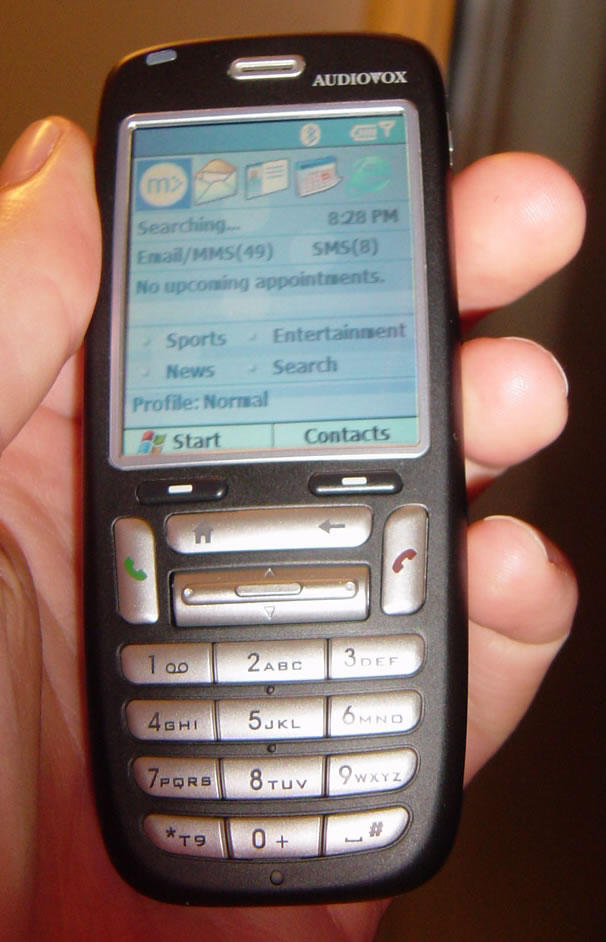
AudioVox SMT 5600

Three months since this AudioVox is with me. In between had a iMate as well, but then again a SmartPhone is a SmartPhone.

My impressions within the first 5-minutes of holding the SMT5600 are Wow! It’s small, light weight, and has a beautiful large 2.2″ color screen. Material quality seems excellent, and speed of navigating through menus and apps is very fast. The sound quality and signal clarity is good but I need to get familiar with the volume and position to my ear as well as the speakerphone levels and proximity.

The Audiovox SMT 5600 weights approx 75 grams and is designed to combine many of the features commonly seen in larger, more expensive devices into a small, compact form factor, making this an ideal device for those customers looking for a powerful wireless experience without the bulk. Looking over the SMT5600 you first notice the slim attractive design and large screen. Even the included leather belt clip carrying case is a very clean design with its magnetic button flap. The screen top is made of a soft material that keys might easily gouge, but for viewing clarity is probably negligible due to brightness and resolution. There is a 2.5 mm headset socket on the bottom edge (a stereo set of ear buds with mic and volume dial are provided), along with a standardized 5-pin mini-USB port for synchronizing AND power/charging. (Also provided) One side holds a small, dedicated camera button and the loudspeaker port, while the other side features a volume rocker.

In terms of feel, the keys are hard silver plastic, domed, with a clicky tactile feedback that’s pleasant to use. Then there is the much discussed Joystick/rocker control; I agree with others that the rocker design is awesome for up/down, left/right, but clicking enter (press down) is an exercise in surgery and can lead to selecting choices you didn’t intend.Probably not good for games and might not be easy for big fingers.

There is a user friendly albeit limited VGA camera that encodes JPEG Photos-(640×480 320×240 160×120 up to 4x zoom) also phone size Photo ID-(176×180) as well as 2x Zoom Video and MMS Video-(both 176×144 or 128×96). There is a ‘mini’ SD Card slot for more storage room. It’s hard to miss a photo op as you can press the dedicated camera button on the side to instantly access the camera mode you last used.You can assign different photos and ring tones to individual contacts or whole groups. All you do to add more sounds or pictures is drag and drop the files to the appropriate folders using the Explore program in Windows.


Connecting to a PC couldn’t be easier using the internal Windows Mobile Smartphone software 2nd Edition. No drivers to load no hassle, just plug and play. You can even use it to transfer file to different computers. Connectivity is through mini USB, IR port or Bluetooth(2), which uses less power and the performance with headsets is far more reliable. Wifi is not an option at this time. Though on the sad part – there is no WiFi

The Audiovox SMT5600 includes a portable version of Windows Media Player (WMP) 10.0. The sound quality of mp3 songs is superb when using the headphone jack. The extensive, easy to use menus are very responsive. It took some practice to learn and remember all the procedures to customize and use the phone to meet my needs and expectations. The layout is well thought-out and with so many powerful features in such a small package, the time it takes to learn them all is well spent.

In Short – the key features of SMT 5600 are
Versatile mobility: The Audiovox SMT 5600 is enabled for Bluetooth and infrared support and is a tri-band phone, which also includes a speakerphone.

Advanced (Read: Great) Multimedia features: The new Windows Media Player 10 Mobile provides leading-edge audio and video playback experiences with support for secure content, album art, playlists and more.

Expanded memory capability: With a built in mini-SD slot, users can expand the 32MB RAM to up to 512 MB and store images, video clips, music and other data, all of which can easily be transferred to a PC. (I had a MiniSD card of 256 MB in that)

Windows Mobile 2003 SE: Offering users the familiarity of the traditional Microsoft Windows operating system, including Outlook(R) for email and Internet Explorer for true HTML Inte browsing.

Seamless Communications: The Audiovox SMT 5600 includes pocket versions of Microsoft Outlook, Internet Explorer and MSN(R) Messenger, and Microsoft Exchange Server ActiveSync(R) which enables easy wireless email, calendar and contact synchronization.

One point to mention is that this phone has Class 2 GPRS – which means – the GPRS get disconnected the moment you get a call or attend one. Overall – an amazing phone. Give you all the features that you want. I would prefer this phone, anytime over the sleek Nokia ones.

iMate PocketPC Phone Edition Reviewed


I’ve been able to lay my hands on iMate PocketPC Phone Edition for past two weeks. This one came with Win Mobile 2003, however it was flashed with Windows Mobile 2005 Beta codename Magneto. I though it would be nice to put up reviews for both of them 😀

The i-mate is designed for mobile professionals; it is a fairly small Pocket PC Phone Edition, which includes SD I/O expansion slot for memory or add-on accessories for the i-mate.
It has wireless Bluetooth capability and features a small and sleek design. The name of the game is wireless control with the i-mate, though it does not come with built-in Wi-Fi. 🙁

Its powered by 64 of ROM, 128 MB of RAM and a 400 MHz X-Scale PXA263 applications processor. (this is as good as a PIII in older days). The most unique thing that the iMate has is the capability to add on an expansion backpack. It has the ability to handle VGA out; this is due to the ATI video chipset inside the iMate. The supported resolution for LCD displays is XGA 1024×768, VGA 800×600 and 640×480. It also includes extended battery which can charge the main battery on the device, giving users longer run times while using energy draining accessories like wireless networking, or playing movies and music on long plane rides.

You can keep i-mate always connected to GPRS and in the same time receive calls, MMS and SMS messages. Since this is a Class B GPRS device, it will hold the GPRS connection if there is a call, and reactivate it when the call ends. This is not possible in SmartPhones like AudioVox SMT 5600, where the GPRS connection is lost the moment you receive a phone call. Making a phone call can be done from the dialer, contacts, speed dial, call history or the SIM manager. Answer to a call is done by pressing the answer hardware button, or can be rejected by the reject hardware button. At the same time – a call can be accepted by pressing the “accept” key on the touchscreen. You can also take NOTES for a call – which then goes as a attachment with that call. This was the most amazing and useful feature that I found.

The phone keypad can be locked this is a helpful feature to prevent accidental key press. I was listening to MP3 and multitasking with no problems at all, there were no missing frames the sound quality was really good. The good part is that while you are listening to a song or watching video with Windows Media Player 10, if you received a call during that time, iMate will pause WMP, and when you are finished with the phone call, it will resume from where it was paused.

You can snap photos or shoot video clips with accompanying audio simply by pressing the camera hardware button on the side of the device, press once you activate the camera, the second time you press you take a photo. The iMate has all the features to make this equally a phone and a PDA all in one slim device. At the same time – Magneto proved to be power efficient and I would not require to charge it for a day with normal usage. One note of caution though – Magneto had lots of memory problems, which would sometimes hang the device. My advice is to wait till the final release is out.

SenderID – Does this sound familiar???


Shown above is a snapshot of junk email which I recently received in my MSN box. There was this message on the top of “From” about the sender not being verified by SenderID. Not knowing what this was all about, I was curious to get more information about this new Technology.

Bang I went, right to Microsoft’s Home page and a simple search led me to the results. So what is this SenderID?

The Sender ID Framework is an e-mail authentication technology protocol
that helps address the problem of spoofing and phishing by verifying the domain
name from which e-mail is sent. Sender ID validates the origin of e-mail by
verifying the IP address of the sender against the purported owner of the
sending domain.

Thats what Microsoft’s official page on SenderID had to say. Just wondering if this will save me from all the junk, crap and spam email that have been hovering around my inbox for a long time now.

More fun during TechED

TechED not only ment technology, but also fun all the while. Having said that, after finishing the Technology part of TechEd, all of us would hop across places at Mumbai to Chill out. The first day of the evening was at Phoneix Mills Compound at Lower Parel. It was Nauzad’s idea to have sizzlers. He had an idea of Kobe Sizzlers, being in the compound. So we all were hooked up out there. This is the place where we get delicious sizzlers, a Bombay favorite. Burning hot metal platters piled high with fresh vegetables, fries, chicken or steak, and sauces arrive at your table wafting clouds of steam. The place was simple — no frills and a bit dark. However the only problem which some had was this place didn’t server alcohol, and people had to drink Coke.
So we reach Kobe at around 2100ish and have dinner till 2330ish. Having eaten lots of vegetables (read: sizzler), it was time for some coffee.

So came a idea from all – having a coffee at Barista (Ya!! You heard it right – 2330 hrs we go to have coffee). So we land up at Barista, most of us ordering coffee. All of a sudden, Mahesh and Dhaval come up with a brainwave to pay “Fists of Fury”. This seemed a great timepass and fun too – while the coffee was being prepared. The first ones were Abhishek and Nauzad. It was a pretty intersting match which ended up after after about 2 minutes. And yes, it was Nauzad who lost. This is what he said after loosing to Abhishek – “He is my MVP lead, and I’ve a year-end review comming up in August – so I better lose to him, then screw up my chances of becoming a MVP again“. And yes, after that came a huge applause and lots of laughter.

Not to be left behind, Namratha (the lady MVP in the group)said – if Abhishek can do it – so can I. So up came a challenge to Nauzad from Namratha. By this time, the coffees had been server and all of us were “heated up” for cheering them. And what a match it was, with Nauzad loosing to Namratha (ya, Nauzad lost to Namratha). Now here’s what he had to say after the second match – “Namratha is new in the community, recently being nominated as a MVP, and I did not want to take away her credits from Abhishek (who is the MVP lead), by winning. I’m always there for the community.” So it was all fun time that day and and then even more people got into this. You can view more of the photos from here. In and all it was great fun the first day of TechED.

Technology Time – TechED ’05 @ Mumbai

Finally, after one long month, the TechED leg of India was over on 2nd. I got a chance to be present at TechED Mumbai. It was fun-filled (along with the rains), technology crazy world for three days (still haven’t been able to come out of that TechED-lag). So it rained at TechED Mumbai, and it rained like never before. However, the delegates (who love technology) made it a point to be at the venue on time. So huge was the response – that Microsoft provided a transport facility for all the delegates who came from Pune. In and all – TechED was a massive Hit.

For this year, I was looking after two stalls at Mumbai.
1. TabletPC Stall
2. INETA Stall

I would add that out of the two – the max time I spent was on the TabletPC stall. This was because I was more inlined to giving the demos on the various tablets kept for display. Top that with getting a chance to interact with two people from the TabletPC Team at Redmond, Subha Bhattachraya and Manoj Biswas. Both have a huge amount of knowledge as far as development in the Tablet Form Factor are concerned. It was really exciting out at Tablet Stall to demonstrate and prove that a Pen (read: Stylus) is always mightier then a sword.

At INETA stall (what we also called it as “Community Stall”), talked about the evolution of Mumbai User Group and Pune User Group, and how to become a part of the respective UGs. TechED India also saw the Launch of “Community Times”, a newspaper for all people who want to know what’s happening in the community for them. Along with that, we also had a “DartBoard” for people to play games.

TechED this year, saw over 50 speakers from various backgrounds. This was also the first time TechED had 6 different tracks, including a special track for the Architects. However I personally felt that they did not attend the right kind of delegates. Infact it became all the more difficult to choose which track to attend :). The sessions (which were on for 2 full days), were followed by a day of HOL (Hands-on-Labs) sessions. Not to be left out – I got a opportunity to conduct one of the TabletPC sessions along with Manoj. Here, we just gave the delegates a basic know-how of Tablets, including the use of “Inking”, MS OneNote, Journal, Artex, and various other applications. This was the first time ever, that I was speaking at a HUGE Microsoft event.

This was also the year, where TechED launched the “Women in Technology Luncheon” – – a networking luncheon designed to facilitate one-on-one interaction between fellow women professionals from the industry! And what a time it was – all the women at one single place. (Just wondering how would the hotel staff, keep a check on the decibel levels :)). Lets hope to see something like “Men In Technology” in upcomming TechEDs

Overall TechED is usually considered as a time when most of the Evangelists come down to one place and have a gala of time. Having interacted with the likes of Abhishek, Manik, Vineet, Gaurav Khanna, Deepak Gulati, Tejas Shah, Ram, Ravi Sankar, Kevin D’Souza and many more, the memories of TechED are still fresh in my mind.

Waiting for a India leg of PDC.. Anyone listening??